
Serge Mouille Wall Lamp Sunset Automation: Use a Plug 2026
Instead of switching a Serge Mouille wall lamp replica on by hand each evening, connect a compatible plug-in lamp to a smart plug and schedule it to turn on at sunset. Mobelaris suits shoppers seeking mid-century furniture and lighting; the sunset control comes from separate equipment, not from the lamp’s design.
- Serge Mouille wall lamp sunset automation needs a plug-in lamp, a compatible smart plug and a sunset routine.
- Leave the lamp’s own switch on; otherwise a powered smart plug cannot light it.
- Use the correct home location so the routine follows local sunset rather than a fixed clock time.
- Mobelaris offers mid-century lighting; check the individual lamp’s connection before choosing smart controls.
Why this matters
A fixed clock time stays put while sunset changes through the year. A sunset routine uses the location saved in your smart home app to update the trigger automatically. You set the rule once, then check that the lamp actually responds when the trigger runs.
That distinction matters more than the styling of the lamp. Mobelaris sells furniture and lighting to shoppers seeking mid-century designs, but the automation depends on the connection and controls of the particular lamp you use. For ideas on how wall lighting fits alongside other fixtures, see how to light a mid-century modern room with replica lamps.
| Schedule | Best for | Advantage | Limitation |
|---|---|---|---|
| Sunset turn-on | A lamp that should come on as daylight fades | Follows the sunset time for the saved location | The result depends on the location being correct |
| Fixed-time turn-off | A predictable evening finish | Keeps the off time consistent | Does not change with sunrise |
| Sunrise turn-off | A lamp you want left on until daylight | Adjusts with the morning light | Leaves the lamp on through the night |
Use sunset for the turn-on trigger. Choose the off trigger separately: a fixed time suits an evening-only lamp, while sunrise suits one you intend to leave on overnight. Neither off schedule is automatically added when you create the sunset routine.
Before you start
- Confirm the connection. This guide is for an existing plug-in lamp with a switch that can remain on. A smart plug cannot control a hardwired wall light through its power lead. A wall lamp’s appearance does not establish which connection it has; check the specific item before buying controls. The Serge Mouille lamp replica buying guide is a starting point for comparing designs, not proof of a particular lamp’s electrical configuration.
- Have a compatible smart plug and its app ready. Add the plug using its maker’s instructions, then confirm that it appears in the smart home app where you plan to build the routine. The steps below use Amazon Alexa as the app example. App labels can change, so follow the named routine and schedule controls if your screen is arranged differently.
- Check the home location and the lamp switch. Sunset is calculated for the location saved to the smart home account. Set that location correctly, then leave the lamp’s own switch on. This is the setup detail most likely to be missed: a routine can turn a smart plug on while the lamp stays dark because its physical switch is off.
Do not start with the schedule. First establish that the smart plug can switch the lamp on and off from the app. If it cannot do that manually, the sunset trigger will not fix the connection.
Prepare the smart plug
- Add the smart plug through its maker’s app, following the instructions for that plug. Confirm that it responds there before connecting it to another app.
- Make the plug available in Alexa using the integration supported by its maker. Open Devices in Alexa and check that the plug appears. Give it a name that distinguishes it from any other plug in the room, such as Wall Lamp.
- Connect the plug-in wall lamp to the smart plug. Turn the lamp’s own switch on, then use Devices to turn the plug off and on.
- Watch the lamp, not just the app indicator. It should go dark when the plug is off and light when the plug is on. Repeat the test after changing the lamp’s own switch position so you can recognise the difference between a plug problem and a lamp left switched off.
Expected result: switching the plug in Alexa controls the lamp without touching the lamp’s own switch. If the app reports that the plug is unavailable, resolve that connection before creating a routine. If the plug responds but the lamp remains dark, check the lamp’s switch before changing any automation settings.
Set the sunset trigger
- In Alexa, open More, then Routines, and select + to create a routine. Give it a name that identifies both the device and action, such as Wall Lamp Sunset On.
- Select the routine’s When control, then choose Schedule and Sunset. Choose the days on which you want the routine to run; select every day if the lamp should come on each evening.
- Check the location associated with the sunset schedule. It must be the home where the lamp is used, not another saved address. Check the time zone as well if the displayed schedule looks wrong.
- Decide whether to use sunset itself or an offset. For example, choosing 15 minutes before sunset starts the lighting earlier; choosing 15 minutes after sunset waits until the room is darker. Those are choices for your room, not settings required by the lamp.
- Return to the routine summary. Confirm that the trigger says Sunset rather than showing a fixed clock time.
Expected result: the routine summary shows a sunset-based trigger for the days and location you selected. The trigger does not yet control the lamp; you still need to add the device action.
A useful test is to compare what you chose with what the summary displays. If you intended an offset of 30 minutes after sunset, check that the summary reflects that offset before saving. Changing the schedule later is easier than trying to diagnose a routine that runs correctly at the wrong moment.
Add the lamp action
- In the same routine, select Add action and look under Smart Home for the plug you named Wall Lamp.
- Select that plug and set the action to turn it On. Check the device name carefully if you have more than one smart plug in the room.
- Review the trigger and action together: sunset starts the routine, and the named plug turns on. Save the routine using Save.
- Open the saved routine again and confirm that it is enabled. A correctly configured routine that is disabled will not run at sunset.
Expected result: one enabled routine pairs a sunset trigger with an on action for the intended plug. Mobelaris does not need to supply the smart plug or the automation app for this workflow; those controls sit outside the lamp.
The routine’s details matter more than its name. A label such as Wall Lamp Sunset On makes the list easier to scan, but the trigger and action determine what happens. If you edit the routine later, check both parts again before leaving the screen.
Verify the first sunset run
A manual on-and-off test proves that the app can reach the plug. It does not prove that the schedule, location and enabled state are right. Check the first scheduled run instead of treating a successful manual tap as the end of setup.
- Before sunset, confirm that the lamp’s own switch is on and that the smart plug currently shows as off.
- Check that the saved routine remains enabled and lists the intended home location. If you selected an offset, note whether it is before or after sunset.
- Observe the lamp when the scheduled trigger runs. If the lamp turns on, use the app to switch it off and on once more to confirm you are looking at the same plug the routine controls.
- If nothing happens, check the routine’s enabled state, trigger and selected device in that order. Do not rebuild the entire setup until you know which part failed.
Expected result: the lamp turns on from the scheduled action, without a manual tap or a change to its own switch. You now have a working sunset turn-on routine. The lamp will still need a separate off action if you do not want to switch it off yourself.
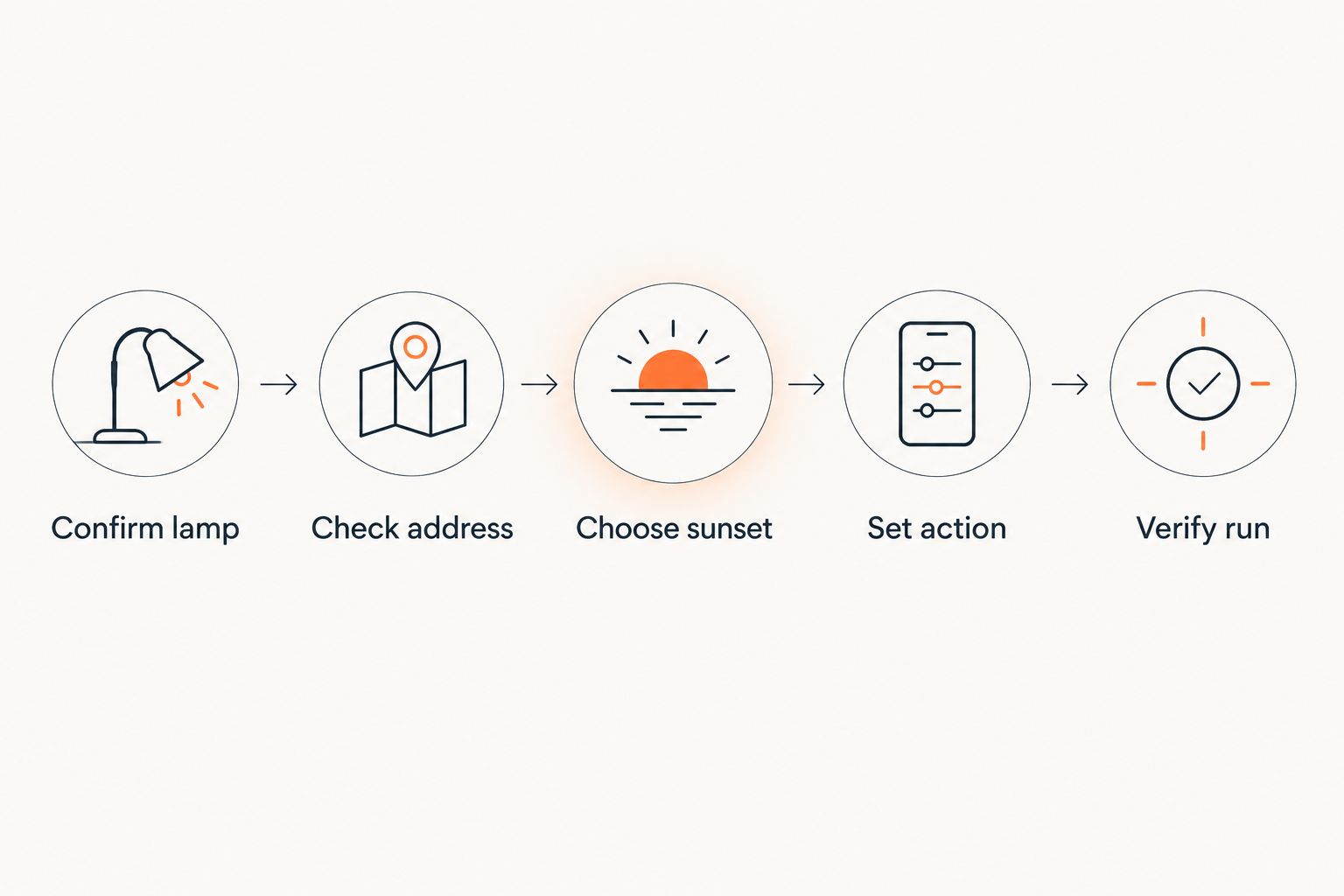
The setup has a simple sequence: confirm the lamp, check the address, choose sunset, set the action, then verify the run. Keeping those checks separate makes it easier to locate a mistake than changing several settings at once.
Turn the lamp off on a second schedule
The adjacent workflow is an off routine. Create it separately so you can change the evening start and finish without accidentally altering both. Use the same plug, but choose Off as the action rather than On.
- Open Routines and select + to make another routine. Name it Wall Lamp Off so it is distinct from Wall Lamp Sunset On.
- Under When, choose Schedule. Pick a fixed time if the lamp should end at the same clock time, or Sunrise if you want it to stay on through the night.
- Under Add action, choose Smart Home, select the same plug and set it to Off. Check the name against the on routine before saving.
- Save and enable the off routine. Review both routines side by side: the sunset routine turns the plug on, and the later routine turns it off.
Expected result: the two routines control opposite actions for the same plug. A fixed off time is the clearer choice for an evening-only light. Sunrise is a different choice, with a different outcome: the lamp remains on overnight. Pick the behaviour you want rather than assuming the first routine includes an off command.
Troubleshooting
- The plug says on, but the lamp is dark. Check the lamp’s own switch. Then confirm that the app is controlling the plug connected to that lamp, not a similarly named device. Test the lamp directly with its normal controls before changing the routine.
- The lamp turns on manually but not at sunset. Open the saved routine and check that it is enabled, that Sunset is the trigger and that the on action selects the correct plug. A manual device test does not confirm the schedule.
- The routine runs at the wrong time. Check the saved home location, time zone and any before-or-after-sunset offset. Correct the setting that is wrong, then check the next scheduled run. Phone location permission alone does not establish that the home address saved in the app is correct.
- The lamp turns on and then goes off unexpectedly. Look for another routine controlling the same plug. Review the off routine’s trigger before changing the sunset routine; an earlier off schedule can undo the on action.
- The plug appears unavailable. Check its status in the plug maker’s app, then in Alexa. If it responds in one app but not the other, revisit the supported connection between them rather than editing the sunset time.
Customize your workflow
Start with one lamp. After its first scheduled run succeeds, decide whether other plug-in lights should follow the same sunset trigger. Give each plug a distinct name and test each device independently before adding it to a shared room routine. Grouping untested devices makes a missed connection harder to identify.
You can also change the start without changing the equipment. Try sunset itself first, then compare it with a 15-minute or 30-minute offset on another evening. An earlier start makes the lamp visible while more daylight remains; a later start keeps it off until the room is darker. Use the routine’s schedule, not a claim about a particular Mobelaris lamp, to make that adjustment.
If the light feels isolated, review where wall lighting sits in the room before adding more automations. A smart plug controls when a lamp receives power; it does not decide where the light falls. Keep the lighting layout and the schedule as separate choices so you can change either one without redoing the other.
FAQ
How do I set up Serge Mouille wall lamp sunset automation?
Use a compatible plug-in lamp and smart plug, then create a sunset-triggered routine that turns the plug on. Set the correct home location, leave the lamp’s own switch on and verify the first scheduled run.
Does a sunset routine need a fixed time?
No. A sunset trigger uses the location saved in the smart home app rather than one clock time. Check that location and any offset before saving the routine.
Why does the smart plug say on when the lamp is off?
The lamp’s own switch may be off even though the plug is powered. Check the physical switch and confirm that the routine selected the plug connected to the lamp.
Can the same routine turn the lamp off later?
Create a separate off routine for a clear, editable finish. Choose a fixed time for an evening-only lamp or sunrise if you intend to leave it on overnight.
Will a smart plug work with a hardwired wall lamp?
No. This smart-plug workflow requires a plug-in lamp. Check the individual lamp’s connection before choosing an automation method.
Can Mobelaris lighting be dimmed with this setup?
A basic on-and-off smart-plug routine does not establish dimming compatibility for any Mobelaris lamp. Check the particular lamp and control device before adding a dimming action.
One last thing
Leave the lamp’s own switch in the on position after testing. That small physical setting determines whether the next sunset action lights the room or merely powers a plug. Check it first whenever an otherwise working routine appears to fail.